How to Type Numbers and Symbols Without Looking at the Keyboard
Most digits sit twice as far from home as the letter below them, and the key straight above most of your fingers belongs to a neighbour. The map, the 6 argument, and four drills.
Every digit belongs to a finger you already use for letters. Left pinky on 1, ring on 2, middle on 3, index on 4 and 5. Right index on 6 and 7, middle on 8, ring on 9, pinky on 0, and that same pinky takes the hyphen and equals beyond it.
You can know all of that, type letters at 60 words per minute, and still look down for every price and date. The number row takes away three things the letter rows let you rely on. Once you know which three, you can drill each one.
Why your eyes go to the number row#
Distance comes first. Reaching from D up to E covers 1.03 key widths, about 20 mm on a full-size board. Reaching from D to 3 covers 2.14, about 41 mm. For eight of the ten digits, that is about twice the reach to the top-row letter below, far enough that your hand travels instead of your finger stretching. Once the hand moves, the ridges on F and J leave your fingertips, and with them the way you find home by touch.
Direction comes second. Keyboard rows step to the right as they go down: the top row starts one and a half keys in from the edge, the home row one and three quarters. Work that backwards and nine of the ten digits sit up and to the left of the finger that owns them. Only 5 leans right.
You can check the consequence on your own keyboard. Rest your fingers on home and look at what sits straight above each one. Above A is 2. Above S is 3, above D is 4, above K is 9 and above L is 0. For six of your eight fingers, the digit directly overhead belongs to the finger next door. Reach straight up and you type the next digit along: 4 for 3, 9 for 8. If your number-row typos run one key high, this is a likely reason.
Practice comes third. Letters turn up in every word you type. Digits arrive in bursts, a date here and a total there, so your fingers get a fraction of the repetitions, and the reach you repeat least is the one your eyes keep checking.
The number row, finger by finger#
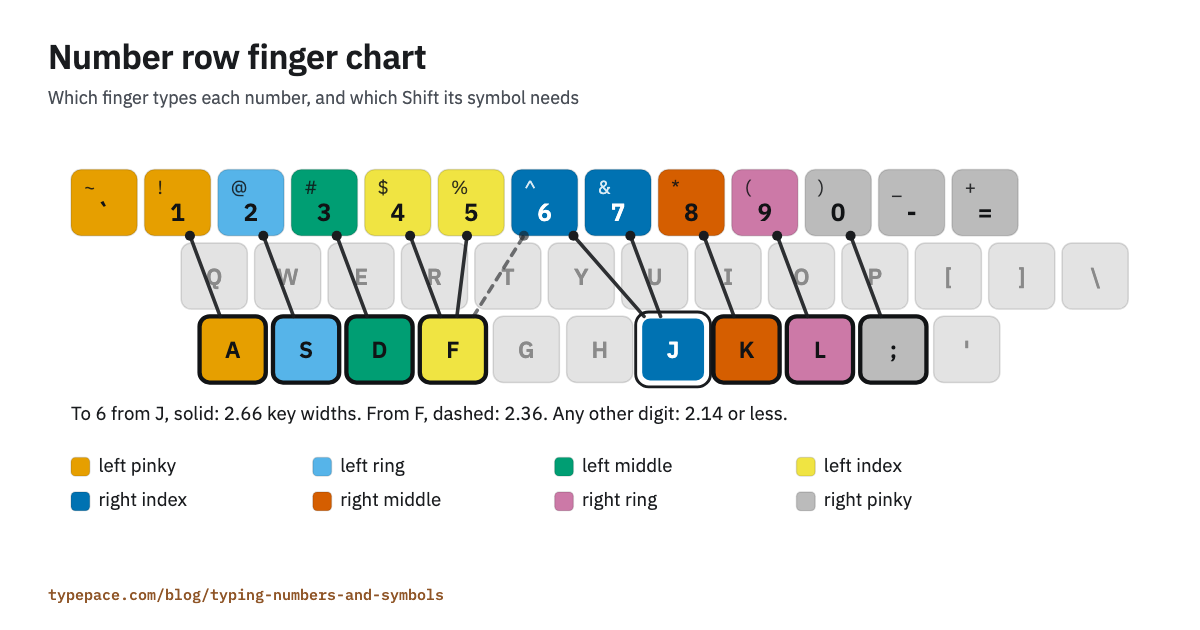
| Key | Finger | Shifted | Hold |
|---|---|---|---|
| 1 | Left pinky | ! | Right Shift |
| 2 | Left ring | @ | Right Shift |
| 3 | Left middle | # | Right Shift |
| 4 | Left index | $ | Right Shift |
| 5 | Left index | % | Right Shift |
| 6 | Right index | ^ | Left Shift |
| 7 | Right index | & | Left Shift |
| 8 | Right middle | * | Left Shift |
| 9 | Right ring | ( | Left Shift |
| 0 | Right pinky | ) | Left Shift |
| - | Right pinky | _ | Left Shift |
| = | Right pinky | + | Left Shift |
A route is easier to learn than a coordinate. Each digit sits above the top-row letter its finger already types, half a key to the left: 3 over E, 8 over I, 0 over P. So the reach for 3 runs from D, through E, and on up. Typepace's number lessons drill that path as "de3" and "ki8", letter by letter, until your hand knows the line.
Then come home after every number. The next letter lands only if your hand returns, so the habit to build is reach, press, back, feel the ridge. It will feel slow at first.
The 6, and the two ways to type it#
Look at where 6 sits. Its centre lies halfway between T and Y, on the line where the left hand's letters end and the right hand's begin, and typing courses disagree about whose it is.
American courses typically teach the right index, and Typepace scores it that way: the engine credits 6 to your right index, and so does the coach. Hungarian courses teach the left, according to the designers of the Ultimate Hacking Keyboard, a split keyboard made in Hungary. They wrote that in 2015 when they put the 6 on their keyboard's left half. Microsoft's Natural Ergonomic Keyboard 4000 also splits between the 6 and the 7.
The geometry favours the left. From J the 6 is 2.66 key widths away, one and three quarters of them sideways, the longest reach of any digit on the board. From F it is 2.36. The case for the right index is balance: each index finger owns eight keys under the standard map, and moving 6 leaves one with nine and the other with seven.
If you already type 6 without looking, with either finger, keep it. Switching means retraining a habit, and the two reaches differ by 0.3 key widths, about 6 mm. If you are learning it now, decide by your keyboard. On a standard board, the right index matches American courses and the way the coach reads your errors. On a split keyboard, learn the finger its 6 sits under. Choose once and never alternate, because a key with two owners is a key neither finger learns.
Pick the left index and your figures for the 6 key stay correct, but the coach files them under your right index.
Symbols, Shift and your right pinky#
The symbols printed above the digits all need Shift. Hold the Shift on the opposite side from the key: right Shift for ! through %, left Shift for ^ through +. The hand typing the symbol stays free to reach, and the other hand's pinky does nothing but hold.
Press Shift a moment before the key and release it after. A 9 where you wanted a bracket means Shift came up a fraction early or went down a fraction late.
Past the digits, the symbols pile onto one finger. Your right pinky owns 0, hyphen, equals, both square brackets, backslash, semicolon, apostrophe and slash, plus Enter, Backspace and the right Shift. How much work lands there depends on what you type.
For ordinary English, the linguist Vivian Cook counted punctuation across 723,000 words of assorted text, in a count published in 2013 that draws on corpora from as early as 1987. The two commonest marks, the full stop and the comma, belong to your right ring and middle fingers. The right pinky still takes 38% of the marks he counted, and 19% need Shift.
| Mark | Per 1,000 words | Finger | Shift |
|---|---|---|---|
| Full stop . | 65.3 | Right ring | None |
| Comma , | 61.6 | Right middle | None |
| Double quote " | 26.7 | Right pinky | Left Shift |
| Apostrophe ' | 24.3 | Right pinky | None |
| Hyphen - | 15.3 | Right pinky | None |
| Question mark ? | 5.6 | Right pinky | Left Shift |
| Colon : | 3.4 | Right pinky | Left Shift |
| Exclamation mark ! | 3.3 | Left pinky | Right Shift |
| Semicolon ; | 3.2 | Right pinky | None |
Cook's table covers nine marks and leaves out brackets and slashes, so read it as the punctuation of written English. Genre shifts the mix as well. A 2019 study by Kun Sun and Rong Wang found that academic writing carries the most semicolons and brackets and newspapers the most hyphens, as BYU's editing research group summarised it.
Code runs on different keys. We counted every symbol in the 48 snippets Typepace serves for code practice, across Python, JavaScript, HTML, CSS, SQL and C++: 1,796 symbols. 60% land on the right pinky and 64% need Shift. 37% need both little fingers at once, the right one on the key and the left one holding Shift. Your left hand types 3% of them.
| Symbol | Share of symbols | Finger | Shift |
|---|---|---|---|
| Opening bracket ( | 9.4% | Right ring | Left Shift |
| Closing bracket ) | 9.4% | Right pinky | Left Shift |
| Colon : | 7.7% | Right pinky | Left Shift |
| Greater than > | 7.5% | Right ring | Left Shift |
| Double quote " | 7.1% | Right pinky | Left Shift |
| Less than < | 7.1% | Right middle | Left Shift |
| Full stop . | 6.8% | Right ring | None |
| Semicolon ; | 5.8% | Right pinky | None |
| Comma , | 5.7% | Right middle | None |
| Equals = | 5.5% | Right pinky | None |
That sample is ours and it is small. Its HTML and C++ account for nearly every angle bracket in it, which is why those rank so high. Count your own code and the order will change. The keys won't: brackets, braces, the colon, the semicolon and both quotes all sit on the right side of the board, most of them under the pinky.
So let the hand move. The coach's fix for a pinky reach is to shift your whole hand a little rather than stretch the pinky alone, and that matters most when the left pinky is pinned on Shift and the right one has the long reach.
The number pad, and when it wins#
If your work is columns of figures, learn the pad. It is a layout built for one hand. Rest your index, middle and ring fingers on 4, 5 and 6, find the ridge on 5 the way you find J, and leave 0 to your thumb and Enter, plus and minus to your little finger. Each finger works one column: index on 7, 4 and 1, middle on 8, 5 and 2, ring on 9, 6, 3 and the decimal point.
The pad wins when numbers arrive with no words around them: invoices, stock counts, a spreadsheet column. Your hand settles once and every digit is a single row from home. The number row wins when numbers sit inside sentences, such as "Room 305 is booked from 10/04", because a trip to the pad and back takes your right hand off the letters and makes it find home again.
Numeric data-entry tests, the kind scored in keystrokes per hour, are usually taken on the pad, which is why our post on typing speed requirements by job treats numeric work as its own skill.
One trap catches people who switch between devices. The pad puts 7, 8 and 9 on top, as calculators did. A phone puts 1, 2 and 3 there, because Bell Labs tested button layouts on people dialling and published the study behind its choice in 1960. Treat the two as different instruments.
If your laptop has no pad, the row is the skill to build. Typepace's Numbers test accepts digits from either, though the finger breakdown after a run assumes you used the row.
Four drills, in order#
- Reach and return. One hand at a time, type the route from home through the top row to the digit and back: de3d, ki8k, fr4f, ju7j. Cover your hands. Go slowly enough that every repetition is clean. The Complete Touch Typing Curriculum in our courses gives each hand its own lesson for this.
- The awkward ones. Drill 6 on its own, then the pairs that cross hands: 1 0, 2 9, 3 8, 4 7, 5 6. Finish with 5 6 7, slowly, until the 6 stops feeling like a guess.
- Real numbers. Switch the test on the practice page to Numbers. It serves dates, prices, phone numbers and invoice lines, and it rewrites every run of three or more digits each time it serves a passage, so you cannot memorise the numbers. Give 1 and 0 extra time. In many kinds of real-world data about 30% of numbers start with a 1, a pattern called Benford's law, and 0 fills every round figure, every .00 and every year this century. Your two pinkies own the digit that starts the most numbers and the digit that ends every round one.
- Symbols as one motion. Switch the source to Punctuation, which runs whole quotations back to back with their punctuation intact. Then move to code practice, where brackets and colons come often enough to train the right pinky.
To see what the number row costs you, run a one-minute test on Words, then one on Numbers, and compare the accuracy. The gap between them is your figure. Run the pair again in a fortnight and compare.
How to tell it is working#
The glances stop being automatic before they stop altogether. First you catch yourself halfway down. Later you notice you haven't looked for a while.
The coach gives you a second check. After a run it names the likely cause of the weakness it found, and three of its labels belong to this post: number-row instability, pinky stretch and symbol unfamiliarity. When those stop appearing, your hands have the map.
Questions worth answering#
Should my thumb press 0? Only on the number pad. On the row, 0 belongs to the right pinky, and a thumb that leaves the space bar has to find its way back.
What if my keyboard puts the symbols somewhere else? On a UK board, Shift and 2 gives a double quote, @ moves to the apostrophe key, Shift and 3 gives £, and # gets its own key beside Enter. Fingers own keys, not symbols, so the map holds: whatever is printed on the 2, your left ring finger types it with the right Shift held. French AZERTY boards need Shift for every digit, and Hungarian boards put 0 to the left of 1, under the left pinky. Practise in French or Hungarian here and the keyboard guide and the coach switch to that board.
Do I need the number row if I mostly write prose? You need it if you look down for it. A glance costs time on the keys that follow it too, which is why breaking the habit of looking at the keyboard is worth more than any single key.
Cover your hands, set the source to Numbers and type for a minute. Then read your errors. If they run one key high, you are reaching straight up.